How to Apply for Your Vietnam e-Visa: A Step by Step Guide
We want your arrival in Vietnam to be easy and stress free.
This guide walks you through the official e-visa form, one section at a time. It also explains what happens when you land.
Visa rules depend on your nationality. This guide is for travellers who need a Vietnam e-visa. Some nationalities can enter Vietnam without a visa, so please check the latest rules for your nationality before you travel.
Although some government guidance requires passports to be valid for six months after arrival in Vietnam, we recommend allowing six months from your departure date as an extra precaution. Your passport should also have at least two blank pages.
The key facts
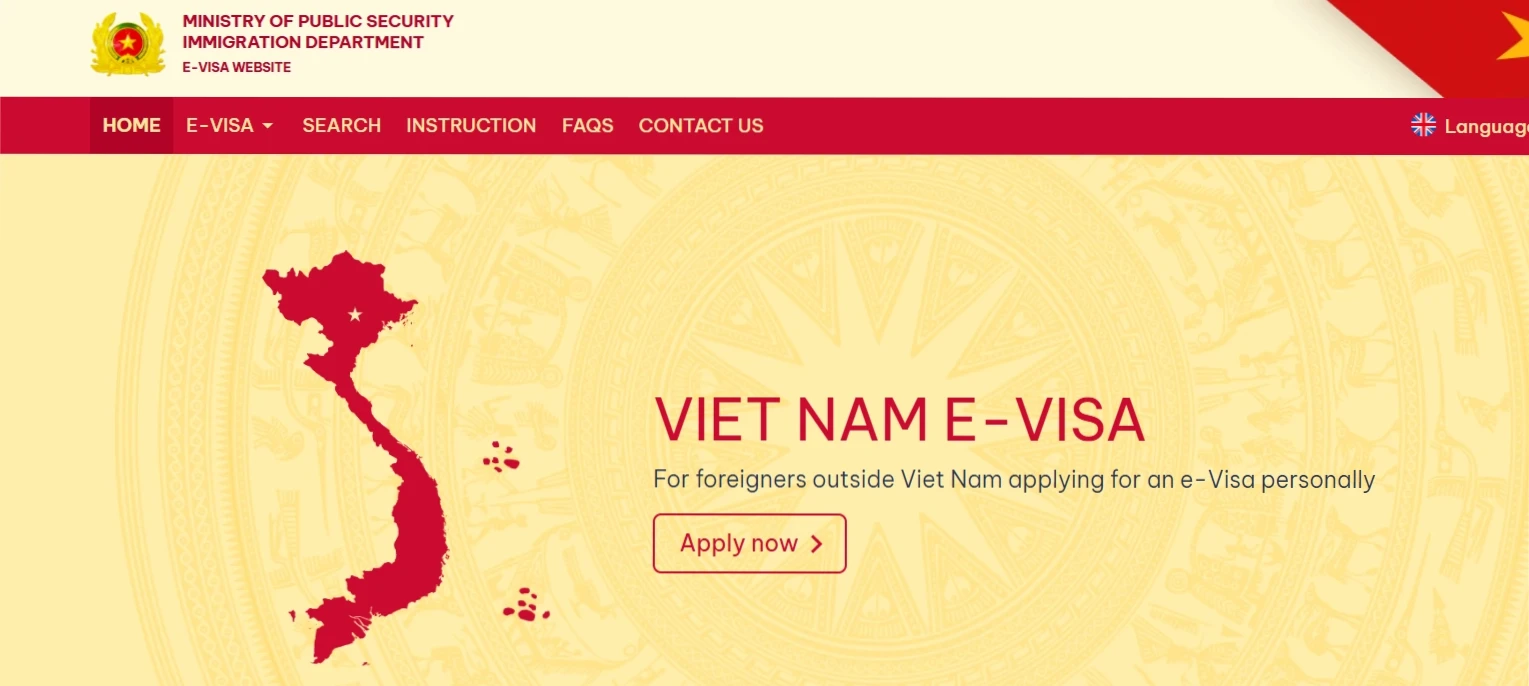
Official website: immigration.gov.vn, or go straight to the form at evisa.gov.vn
Time needed: set aside about 30 to 45 minutes to finish it in one go.
When to apply: at least two to three weeks before you fly.
Fee: paid online by credit or debit card. It is US$25 for a single entry visa (correct at the time of our latest update). Please check the official website for the latest fee.
Refunds: the fee is not refunded if a visa is refused.
Important
Only use the official website. Other sites may look official but charge extra.
The tour details you will need
Some boxes on the form need details about your tour. We will email you these details, so please keep that email open while you apply.
Your arrival date in Vietnam
Your departure date from Vietnam
Your first hotel's name and full address
Your first hotel's phone number
The Province or City, and the Ward, of your first hotel
Your arrival airport
Your departure airport
In this guide, these are shown as [from your tour details email].
How to fill in the form
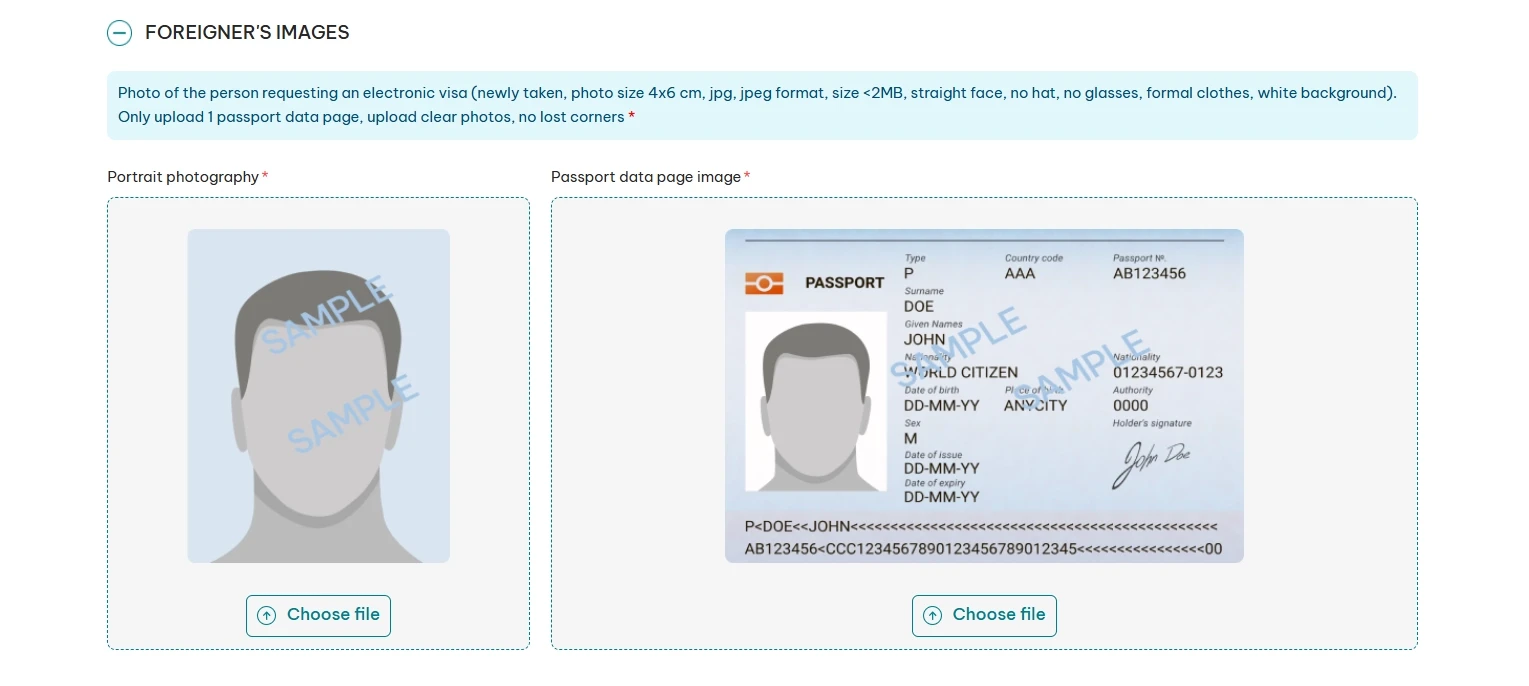
The official form has eight numbered sections. This guide follows the same order, with a screenshot of each one, so you can match what you see on screen.
Take your time. Check every detail against your passport as you go.
The first part of the form is called "Foreigner's images". It has two upload boxes. The form only accepts JPG or JPEG files under 2MB, so save both photos on your computer or phone before you start.
Your portrait photo:
Stand against a plain white wall.
Look straight at the camera with a natural, neutral face.
Take off your glasses and hat. This helps your arrival go much faster.
Keep your hair away from your face and your shoulders covered.
Your head and shoulders should be in the centre of the photo, with no shadows.
The form asks for a recent photo, sized 4x6 cm.
Your passport data page:
Take a clear, bright photo of the main page with your photo and details.
Show the whole page, with all four corners in view.
Lay the passport flat.
Only upload this one page.
Uploading:
Click "Choose file" in the portrait box and pick your portrait photo.
Click "Choose file" in the passport box and pick the photo of your passport page.
Look under both photos before you move on. You want to see a green tick and the word "Match", with no error messages.
If you see an error, read the photo rules on the screen, retake the photo and upload it again.
Top Tip
Turn off your camera flash for the passport photo. Flash can bounce off the shiny page and hide your details.
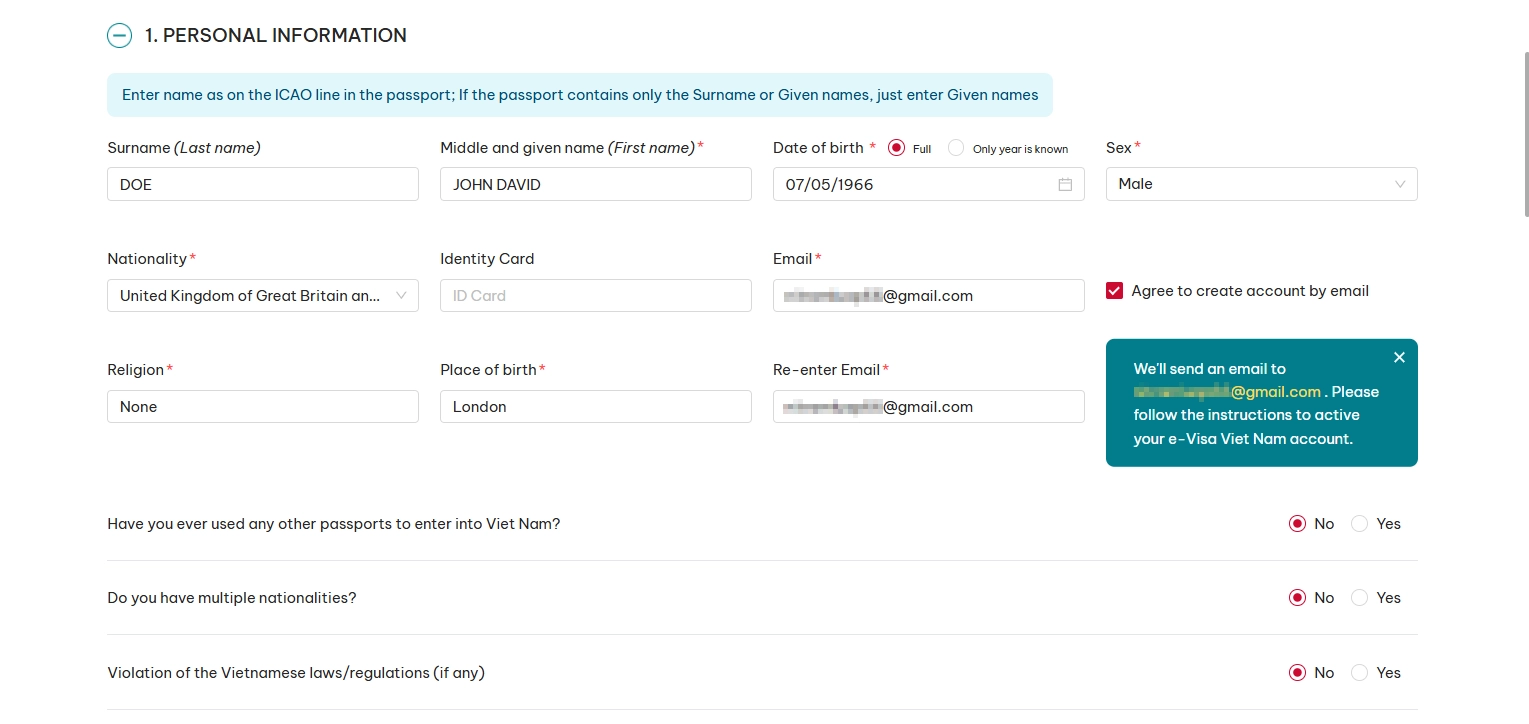
Section 1: Personal Information
The form may fill in some details from your passport photo. Check each one carefully against your passport, then fill in anything missing.
Surname (Last name): your last name only.
Middle and given name (First name): your first name and any middle names.
Date of birth, sex and nationality: exactly as in your passport.
Identity card: fill this in if it applies to you.
Email: use an email address you check often. You will need it later to check your visa.
Agree to create account by email: creating an account is optional. You do not need an account to apply for your visa or check its status. You can check your application and download your approved visa using the official e-Visa search page.
Religion and place of birth: fill these in.
Three Yes or No questions: these ask whether you have used other passports to enter Viet Nam, whether you have more than one nationality, and whether you have broken Vietnamese laws. Answer truthfully. For most travellers, the answer to each is "No".
Your name must match your passport exactly. Even a small spelling mistake can make the visa invalid.
Section 2: Requested Information
Single entry or Multiple entry: choose "Single entry". Only choose "Multiple entry" if you plan to leave Vietnam and come back on the same trip.
Grant e-Visa valid from: [from your tour details email]
To: [from your tour details email]
Your visa must cover your whole stay in Vietnam, not just the tour. Add at least one extra day at each end, in case your plans change.
Good to Know
A single entry visa only works between the dates you choose. It cannot be used outside them, so give yourself a day either side.
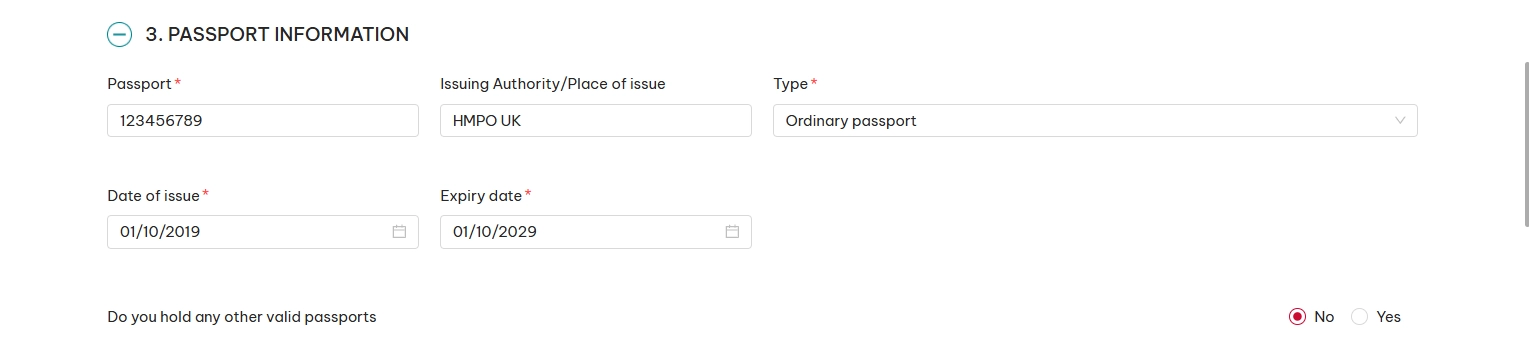
Section 3: Passport Information
Passport number and issuing authority: copy them exactly as they appear in your passport.
Type: choose "Ordinary passport". Most travellers hold one. Only pick another option if it applies to you.
Date of issue and expiry date: exactly as in your passport.
Do you hold any other valid passports: answer truthfully. For most travellers, the answer is "No".
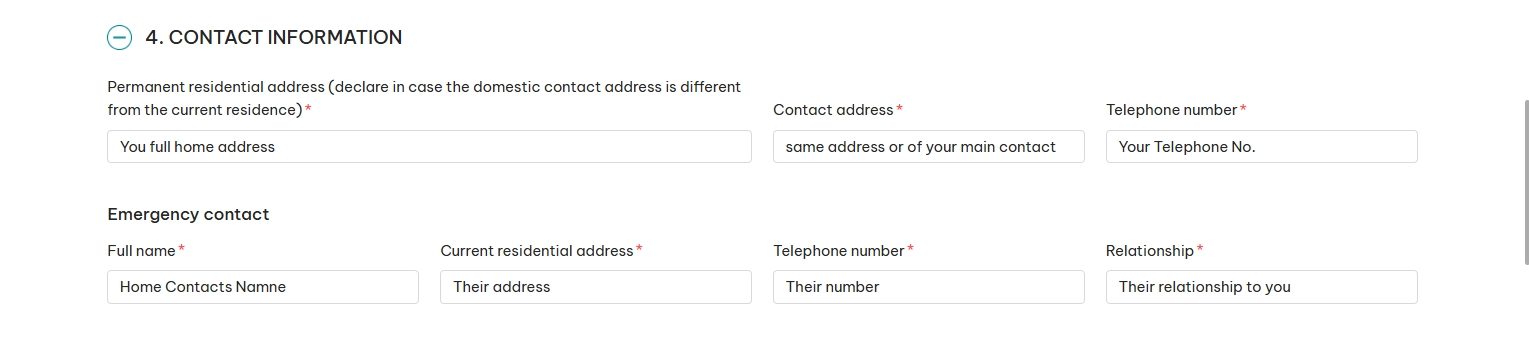
Section 4: Contact Information
Permanent address: your home address.
Contact address: where you can be reached.
Phone number: your own phone number.
Emergency contact: their name, address, phone number and how they are related to you.
Section 5: Occupation
Occupation: your job.
Occupation info, company or school name, position, address and phone: fill in any details the form asks for.
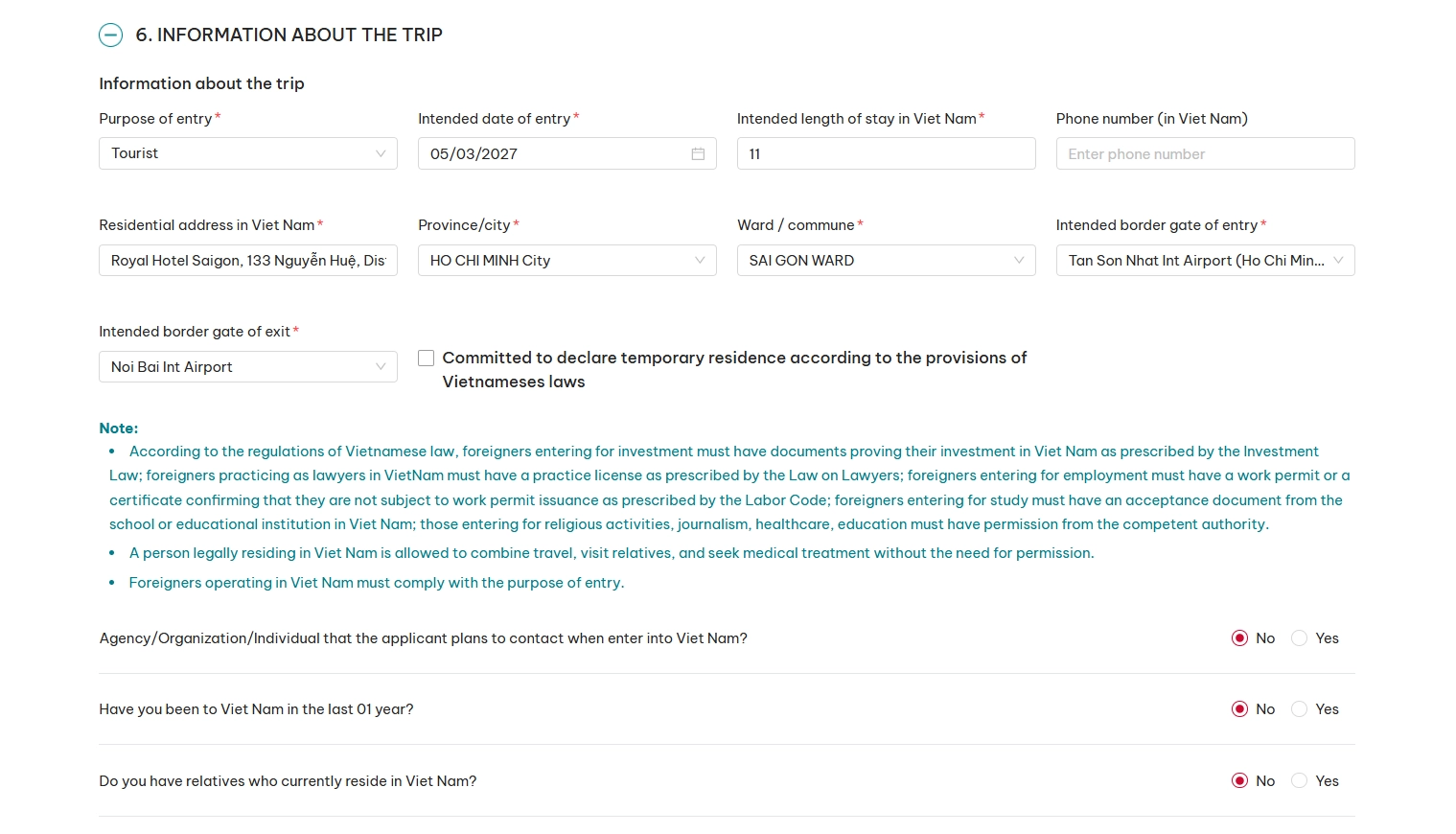
Section 6: Information About the Trip
This section is about your trip. Use the details we email you.
Purpose of entry: choose "Tourist".
Intended date of entry: [from your tour details email]
Intended length of stay in Viet Nam: the number of days you will be in Vietnam.
Phone number (in Viet Nam): this box is optional. If you fill it in, use [from your tour details email].
Residential address in Viet Nam: [from your tour details email]
Province/City: [from your tour details email]
Ward/commune: [from your tour details email]
Intended border gate of entry: [from your tour details email]
Intended border gate of exit: [from your tour details email]
Temporary residence: tick the box to say you will declare your temporary residence under Vietnamese law.
Have you been to Viet Nam in the last 01 year?: answer truthfully.
Do you have relatives who currently reside in Viet Nam?: answer truthfully.
Agency/Organization/Individual that the applicant plans to contact when enter into Viet Nam?: answer "No".
For most travellers, the answer to each of the three questions is "No".
The airport list shows airports by name, not just by city. Look for Noi Bai Int Airport for Hanoi (HAN), or Tan Son Nhat Int Airport for Ho Chi Minh City, also called Saigon (SGN). If you use a different international airport, choose it from the list.
Good to Know
This question is intended for travellers who have a specific Vietnamese organisation or individual to contact during their visit. For a normal GoVegan Travel holiday, select "No", unless you have separate arrangements that require you to declare a contact.
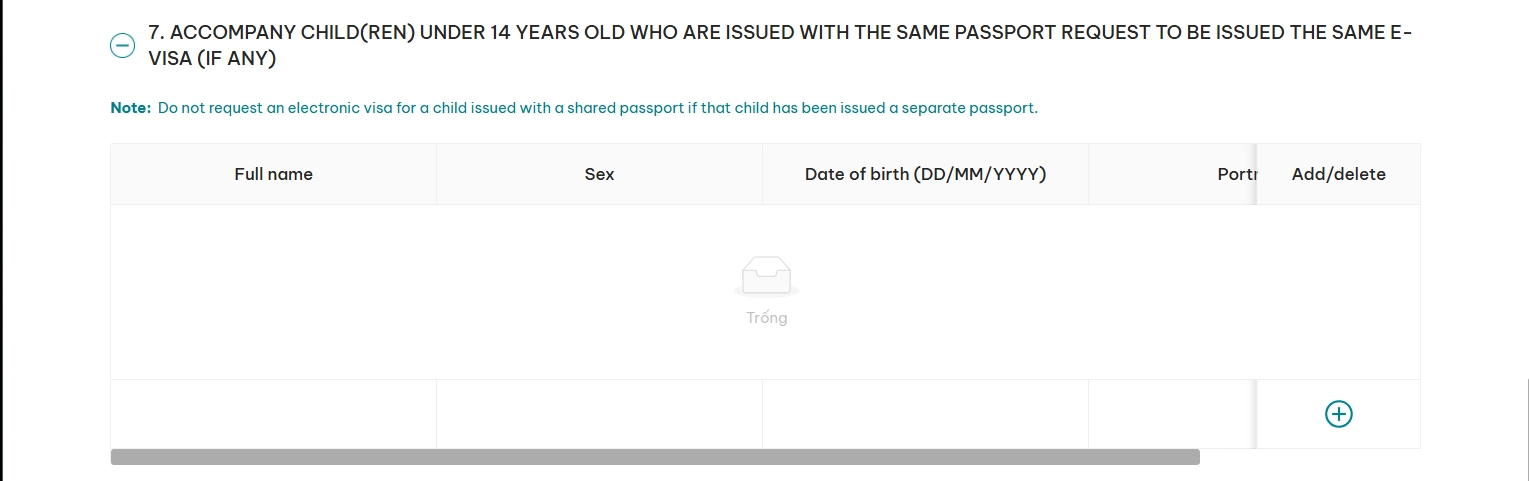
Section 7: Children Under 14 on Your Passport
Only fill this in if a child under 14 is travelling with you on the same passport.
Otherwise, leave it blank.
Section 8: Trip's Expenses and Insurance
Intended expenses (in USD): a rough guess of your own spending money. Do not include what you have already paid us.
Did you buy insurance?: choose Yes or No, depending on whether you have travel insurance. If Yes, the form may ask you to give details.
Who will cover the trip's expenses: choose "Personal".
Payment method: choose how you plan to pay for things while you travel.
Declaration and Next
At the bottom of the form is a declaration box. It says the fee is not refunded if your visa is denied.
Tick the box, then click "Next".
After the Form: Check, Save and Pay
Check everything and type the security code
The next screen shows all your answers. Check every detail carefully, especially your name, passport number, dates and airports.
Type in the security code shown, then click "Next".
Save your e-Visa app no.
You will then see a notice that your declaration is complete. It shows your e-Visa app no. Take a screenshot or write it down straight away. Older guides, including our earlier one, call this a registration code.
Your application is not sent until you pay, so this is not the last step.
Top Tip
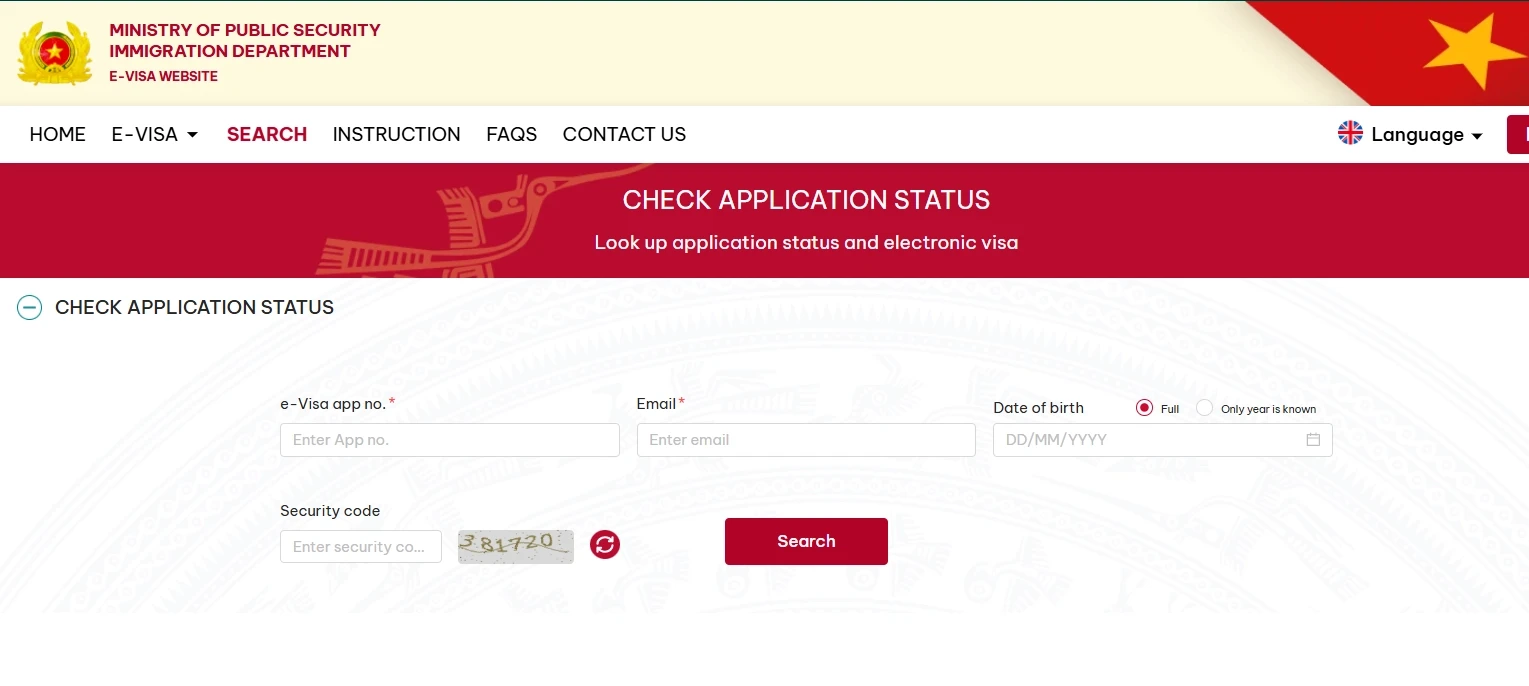
Keep your e-Visa app no. somewhere safe, on paper and on your phone. You need it, with your email and date of birth, to check your status and download your visa.
Pay the fee
Click "Confirm" to go to the payment page. Check your details once more.
Tick "I agree to pay", then click "Payment". Choose your payment type and enter your card details. Follow the steps on screen until you see that your payment is complete.
The payment status can take up to two hours to update. Please do not pay twice.
The official site shows these last screens on its own guide. At evisa.gov.vn, click "INSTRUCTION" in the top menu.
Save a copy of your application
After payment, click "Look up records". Enter the details you saved, then click "Search".
Click "Save form" to download a copy of your application.
Well done. You have finished the form.
Checking your status and printing your visa
You may receive an email about your application, but don't rely on this. You can check your e-Visa application status directly on the official website without creating an account. You'll need your e-Visa application number, email address, date of birth and the security code shown on screen.
Most visas are processed within three working days of payment. Some take longer if they need extra checks, up to about 15 working days. This is why we ask you to apply two to three weeks before you fly.
When your visa is approved:
Download your visa.
Check your name, date of birth and dates against your passport.
Print at least two colour copies.
Print a third copy as a spare.
Some airlines ask to see a paper copy before you board.
Arriving at the airport
Good to Know: Vietnam Digital Arrival Card
Vietnam has introduced an online arrival declaration for international visitors at several major airports, including Ho Chi Minh City and Hanoi. It's currently voluntary, but completing it within three days before arrival is recommended to help speed up immigration.
Walk past the "Visa on Arrival" or "Landing Visa" desks. You do not need them.
Go straight to the normal passport control lines.
Hand the officer your passport and one printed copy of your visa.
Top Tip
Check the entry stamp in your passport before you leave the desk. Make sure the "Valid Until" date covers your whole visit, including any time after the tour.
Luggage and customs
Collect your checked bags, then go through customs.
Meeting your GoVegan Travel representative
After collecting your bags and passing through customs, follow the signs to the public arrivals area.
Your exact meeting point will depend on your arrival airport and terminal. We will send you the exit, meeting location and any other details you need no later than one week before you arrive.
Our representative will be waiting at the meeting point given in your arrival details to greet you and take you to your hotel.
Your final checklist before you fly
Passport valid for at least six months after leaving Vietnam, with at least two blank pages
Two or three colour printed copies of your e-visa
Your e-Visa app no. saved, on paper or on your phone
GoVegan Travel emergency contact details (we will send these closer to departure)
Frequently asked questions
How long does the e-Visa form take?
Allow about 30 to 45 minutes. Have your two photos ready before you start.
When should I apply for my Vietnam e-Visa?
We recommend applying at least two to three weeks before you fly. Processing times vary, so earlier is better if your travel dates are confirmed.
Can I arrive in Vietnam after my e-Visa starts?
Yes. You can arrive on any date within your approved visa's validity period. Arriving later doesn't extend its expiry date. See the official Vietnamese Embassy FAQs for confirmation.
Can I arrive before my e-Visa starts?
No. Your e-Visa must already be valid when you enter Vietnam. If your plans change, you may need to apply for a new visa.
No. You can check your application without an account. You'll need your e-Visa application number, email address, date of birth and the security code shown on screen.
What's the difference between single entry and multiple entry?
A single entry visa allows you to enter Vietnam once. A multiple entry visa allows you to leave and return during its validity period. For a GoVegan Travel holiday without a separate trip outside Vietnam, single entry is normally sufficient.
Do I need to go to the Visa on Arrival desk?
No. With an approved e-Visa, take your passport and printed visa directly to the normal immigration counters.
What if my visa is refused?
The application fee is not refunded.
Last updated: November 2026
Be the first to know!
Subscribe to our vegan travel newsletter for new tour announcements, special offers and practical vegan travel tips.